
How to Disassemble a Samsung TV Safely | The Great Discovery
Disassembling and assembling a Samsung flat-screen TV involves carefully separating the TV's components—including the stand, bezel, and internal parts—following manufacturer safety procedures to replace parts, perform maintenance, or prepare for wall mounting or transport.
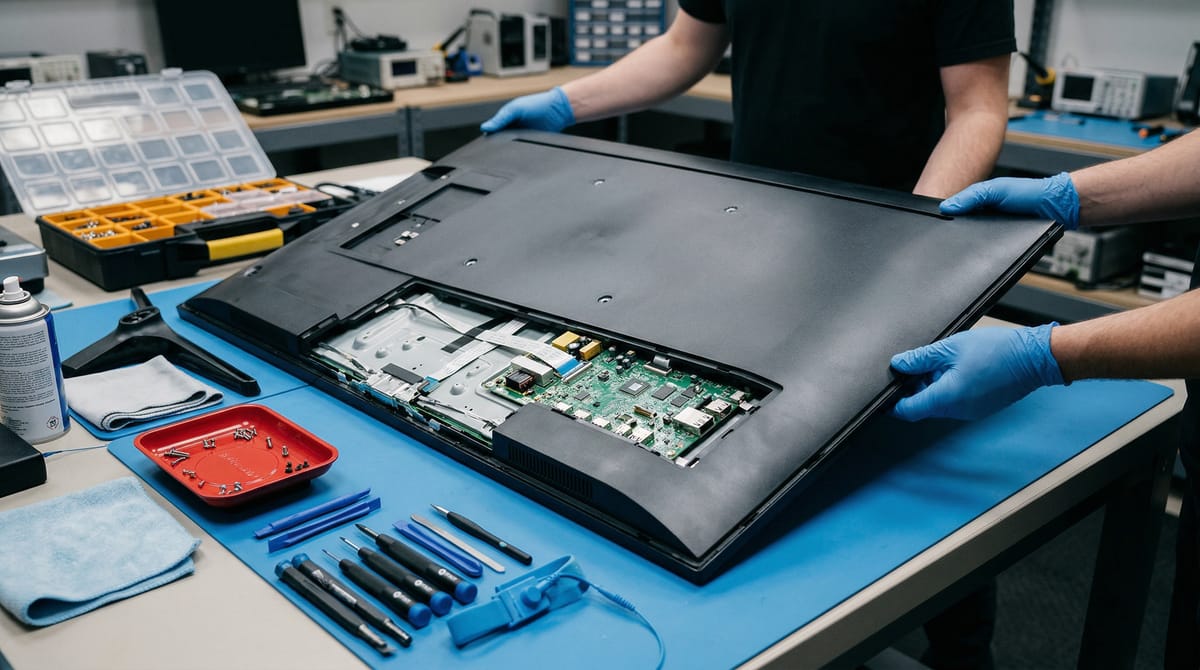
How to Disassemble and Assemble a Samsung TV Safely
Disassembling and assembling a Samsung flat-screen TV involves carefully separating the TV's components—including the stand, bezel, and internal parts—following manufacturer safety procedures to replace parts, perform maintenance, or prepare for wall mounting or transport.
Key Takeaways
- Samsung TVs have specific stand installation procedures—screws go in from the top, not the bottom, according to Samsung's official setup guide
- You need at least two people to safely mount a Samsung TV; for 82-inch or larger models, Samsung recommends four people
- All Samsung TVs follow VESA compliance standards, with mounting patterns ranging from 100x100 to 600x400 depending on size
- Samsung's Self-Repair program provides genuine parts, tools, and repair manuals so you can fix your TV safely and correctly
- Always unplug your TV before beginning any disassembly and use ESD precautions to protect sensitive electronics
Table of Contents
- Understanding Samsung TV Disassembly and Assembly
- Key Concepts and Techniques
- Who Benefits from Learning This?
- What Do Students Say?
- About the Creator
- Samsung TV Components and Assembly Techniques
- Watch Before You Enroll
- Frequently Asked Questions
- Conclusion
- Explore More on TGD
Understanding Samsung TV Disassembly and Assembly
Disassembling and assembling a Samsung TV is a precise process that requires understanding both the physical components and manufacturer guidelines. Whether you're replacing a damaged screen, installing a new stand, or preparing your TV for wall mounting, knowing the correct procedures prevents damage and ensures safety.
According to Samsung US Support, the Quick Setup Guide should be opened first after unboxing your TV, and many stand installation steps follow a specific sequence. For TVs 75 inches or larger, Samsung's setup guide notes that you may install the stand while the screen stays protected in the box, minimizing risk of damage to the screen itself.
The physical anatomy of a Samsung flat-screen TV includes multiple fastener types and assembly points: the stand assembly (which screws go in from the top, not the bottom), the back panel housing ports and internal components, the bezel trim that snaps into place, and the internal mounting bracket that follows VESA standards. Each component requires different handling techniques and fastener specifications.
Safety is paramount. Samsung's Self-Repair program emphasizes unplug your TV before disassembly, use proper safety equipment, and follow ESD (electrostatic discharge) precautions to protect sensitive electronics. Modern Samsung TVs—including the 2026 Mini LED lineup that reaches sizes from 43 inches up to 100-inch class models—share these safety principles even as screen sizes grow.
Want to Learn Samsung TV Disassembly Step by Step?
This intermediate course on The Great Discovery covers all of the fundamentals, safety procedures, and assembly techniques you need to confidently disassemble and reassemble your TV.
Key Concepts and Techniques
Mastering Samsung TV disassembly requires understanding five core areas: VESA mounting standards, stand assembly sequences, safety protocols, component care, and proper fastener identification. Each concept builds on the others and directly impacts your success.
VESA Mounting Standards and Measurements
VESA (Video Electronics Standards Association) compliance ensures that your TV works with universal wall mounts and stands. According to Samsung US Support, common VESA mounting patterns for Samsung TVs range from 100x100 up to 600x400 depending on TV size and model. The larger the TV, the larger the VESA pattern required. For bolt length, Samsung's mounting guide states you should add the TV's C measurement (the distance from the mounting bracket to the back of the TV) to the wall mount thickness, then add spacer or washer thickness if used.
Stand Assembly and Installation Sequence
Samsung's setup guide specifies that stand screws go in from the top, not the bottom—a detail that many people overlook. The stand assembly should be completed with two people minimum for screens 55 inches and larger. According to Samsung Caribbean Support, four people are recommended for TVs 82 inches or larger due to weight and leverage. Always verify that the stand is level before final tightening, as an uneven stand can cause the TV to tip or put stress on internal components.
Safety Precautions and ESD Protection
Before you touch any internal components, always unplug the TV from the wall outlet. Samsung's Self-Repair program warns that even unplugged TVs may retain electrical charge in capacitors. Wear an ESD wrist strap connected to a grounded surface to discharge any static electricity before handling circuit boards or ribbon cables. Static electricity can instantly damage sensitive components without any visible sign of damage until you power the TV back on.
Bezel and Back Panel Removal
The bezel (the plastic trim around the screen) and back panel snap into place rather than screw in place on most Samsung models. Removal requires gentle and even pressure around the perimeter to release plastic clips without cracking the frame. Start at a corner and work your way around, using a plastic spudger or soft pry tool rather than metal tools that could scratch or damage the frame.
Cable and Ribbon Management
Internal TV components connect via fragile ribbon cables and connectors. When disassembling, take photos of the cable routing before disconnecting anything. Ribbon connectors have latch mechanisms (usually small plastic tabs) that must be lifted before pulling the cable out. Pulling a ribbon cable without releasing the latch will tear it, requiring a replacement part and additional disassembly to reach the connector.
Who Benefits from Learning This?
TV disassembly and assembly skills are valuable for multiple audiences, from professionals who repair TVs daily to homeowners making repairs or upgrades. The techniques apply whether your TV is 43 inches or 100 inches, and whether you're handling a basic model or a premium Mini LED.
DIY Home Owners and Enthusiasts
If you own a Samsung TV and need to replace a stand, install a wall mount, or troubleshoot a component, learning disassembly procedures saves you hundreds of dollars in service calls. This course teaches you how to do it safely without voiding your warranty, especially if you use Samsung's Self-Repair program for genuine parts and guidance. At $10, it's more affordable than a single house service call.
TV and Electronics Repair Technicians
Professional repair technicians working on Samsung TVs need precise, standardized procedures to ensure every job is safe and correct. This intermediate-level course reinforces Samsung's official guidelines and safety protocols, helping you handle a wider range of models with confidence. The course covers the universal principles that apply across Samsung's 2026 lineup—from 43-inch entry models up to the 100-inch class.
Content Creators and Installation Professionals
If you install or set up TVs for content studios, offices, or events, knowing how to properly mount and assemble large-format displays is essential. For 82-inch or larger Samsung TVs, Samsung's guidance recommends four people for safe wall mounting—understanding the technical requirements helps you coordinate those teams and complete installations correctly the first time.
E-Waste Recyclers and Refurbishers
Organizations that refurbish used TVs or handle e-waste need safe, efficient disassembly procedures that protect both the technician and any components being salvaged or recycled. Learning the proper techniques minimizes damage and keeps hazardous materials contained and safe during processing.
What Do Students Say?
This course is new to the marketplace and hasn't collected reviews yet. Check back after launch for student feedback.
About the Creator
This course is taught by Ronald Hairston, an experienced instructor who has created 8 courses on The Great Discovery serving a community of 12 learners. With a focus on vocational and technical skills, Ronald brings practical expertise to the topics he teaches.
Ronald's background in electronics and repair gives the course practical credibility. His instruction style emphasizes safety first and includes the manufacturer's official guidance alongside real-world technique tips that only come from hands-on experience.
Visit Ronald Hairston's Creator Profile to see his other courses on The Great Discovery.
Samsung TV Components and Assembly Techniques
Understanding the major components of a Samsung TV and the techniques required for each one is essential for safe disassembly. This table breaks down the key components you'll encounter and the special considerations for each.
| Component | Purpose | Key Assembly Technique | Special Considerations |
|---|---|---|---|
| Stand Assembly | Provides stable base for tabletop placement | Screw in from the top; tighten evenly for level positioning | Minimum 2 people required; 4 people for 82"+ models. Screws go from TOP, not bottom. |
| Back Panel | Houses power supply, circuit boards, and internal components | Remove fasteners around perimeter; gently release internal clips | Unplug TV first. Take photos of cable routing before disconnecting. |
| Bezel Assembly (Front Trim) | Contains the frame and front-facing plastic trim | Use even pressure around perimeter to release plastic clips | Use plastic spudger, not metal tools. Start at corner; work around. Clips can crack if forced. |
| VESA Mounting Bracket | Allows universal wall mounting to any VESA-compliant mount | Verify VESA pattern (100x100 to 600x400 range); ensure bolt length matches specifications | Add TV's C measurement plus mount thickness plus spacer thickness to calculate correct bolt length. |
| Ribbon Cable Connectors | Connect display panel, backlight, and circuit board components | Lift plastic latch before removing cable; never pull on cable itself | Pulling without releasing latch tears the ribbon; requires component replacement. |
| Heatsinks and Cooling Brackets | Dissipate heat from power supply and processor components | Handle carefully; remove thermal pads slowly if replacing parts | Keep dust-free during reassembly. Thermal paste may need replacement on circuit boards. |
These components work together as a complete system. Disassembling one section often requires careful management of adjacent components to avoid damaging cables or connectors. The techniques above are drawn from Samsung's official Self-Repair documentation and manufacturer guidelines.
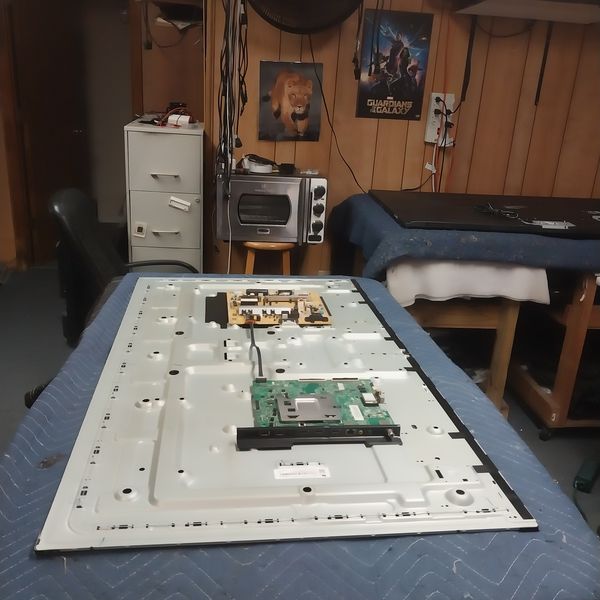
Master Samsung TV Disassembly with Expert Guidance
Ronald Hairston's course covers all of these components and techniques in detail, with structured lessons you can complete at your own pace. Learn directly from someone with hands-on electronics repair experience.
Enroll in Disassembling and Assembling a Samsung Flat-Screen TV →
Watch Before You Enroll
Watch this short video overview to understand the main ideas behind Disassembling and Assembling a Samsung flat-screen tv before you enroll.
This video introduces Disassembling and Assembling a Samsung flat-screen tv and previews in the Lesson, The individual will learn how to take apart a Samsung flat-screen TV.
Frequently Asked Questions
Is It Safe to Disassemble a Samsung TV Myself?
Yes, if you follow Samsung's official safety procedures. Always unplug the TV before disassembly, use ESD protection, and follow manufacturer guidelines. Samsung's Self-Repair program provides genuine parts and official manuals for this exact reason—to enable safe, DIY repairs without voiding your warranty.
What Tools Do I Need to Disassemble a Samsung TV?
Most Samsung TV disassembly requires a Phillips screwdriver, a plastic spudger or soft pry tool (to release plastic clips without scratching), and an ESD wrist strap. You'll also want a work surface large enough to lay the TV flat safely, and helpers if your TV is 55 inches or larger. More specialized tools may be needed for specific internal repairs.
How Many People Do I Need to Safely Handle a Large Samsung TV?
According to Samsung, you need at least two people to mount a TV safely. For TVs 82 inches or larger, Samsung recommends four people. This isn't just for convenience—large TVs are heavy and unbalanced when partially mounted, creating a serious drop and injury risk with insufficient help.
What Are VESA Measurements and Why Do They Matter?
VESA (Video Electronics Standards Association) measurements define the distance between the four mounting holes on the back of your TV. Common VESA patterns for Samsung TVs range from 100x100 (small TVs) to 600x400 (large TVs). Matching your wall mount's VESA pattern to your TV's VESA pattern ensures compatibility and safety. An improper VESA match can result in an unstable or unsafe installation.
What's the Difference Between Samsung's Self-Repair Program and Third-Party Repair?
Samsung's Self-Repair program provides official parts, tools, and repair manuals directly from Samsung. Using genuine Samsung parts and following official procedures maintains your warranty and ensures quality repairs. Third-party parts may be cheaper but carry no guarantee of quality or compatibility. Many DIY repairs done correctly with Samsung parts actually preserve your warranty.
Does This Course Teach How to Fix Specific Problems Like a Broken Screen?
This course focuses on the procedures and techniques for safely disassembling and assembling Samsung TVs. While it equips you with the knowledge to access internal components, specific repair procedures (like replacing a backlight or power board) may require additional specialized knowledge. The disassembly skills taught here are the foundation for any internal repair.
Conclusion
Disassembling and assembling a Samsung TV is a learnable skill that empowers you to handle repairs, replacements, and installations without expensive service calls. Understanding VESA mounting standards, stand assembly procedures, safety precautions, and proper component care transforms a seemingly complex task into a manageable, safe process.
Whether you're a homeowner dealing with a broken stand, a technician building expertise, or someone preparing for wall mounting, the procedures outlined here—drawn directly from Samsung's official guidance—give you the foundation to work confidently. Ronald Hairston's course on The Great Discovery walks through these techniques step-by-step, with real examples and hands-on guidance.
Start the course today and take control of your TV's maintenance and setup.
Explore More on The Great Discovery
- Explore More Electrical & Electronic Repair Courses
- Browse All Vocational & Tech Courses
- View More Courses by Ronald Hairston
- Visit The Great Discovery Homepage
Share Your Knowledge on The Great Discovery
Join Ronald Hairston and hundreds of other creators sharing their expertise. Create and sell your own courses on TGD for just $10 per course or build a subscription membership.